How to Add a Payment Method on Binance and Make Your First Deposit
Getting money into your Binance account is the step most new users find confusing. The account is created, identity is verified, and then the question becomes: how do I actually fund this? Binance supports several deposit methods, and each one works differently in terms of speed, cost, and availability by region. This guide walks through every option clearly so you can choose the right one and complete your first deposit without issues.
What Payment Methods Does Binance Support?
Binance offers four main ways to add funds to your account. Each method suits a different situation, and understanding the differences helps you avoid unnecessary fees and delays.
Credit and debit cards are the fastest option. Binance accepts Visa and Mastercard from most countries. A card purchase converts your local currency directly into cryptocurrency and delivers it to your spot wallet within seconds. The convenience comes at a cost: card purchases typically carry a fee of around 1.8% to 2% of the transaction amount, which is higher than other methods.
Bank transfers are slower but cheaper. Binance supports bank transfers in many regions through its own payment infrastructure or through third-party payment providers. Transfer times range from a few hours to three business days depending on your country and bank. Fees are generally lower than card payments, and some regions offer free bank transfers entirely.
P2P trading allows you to buy cryptocurrency directly from another user using a local payment method such as a bank transfer, mobile payment app, or even cash. The P2P marketplace on Binance supports Korean Won (KRW) and allows Korean users to buy USDT or other assets directly without needing to go through a domestic exchange first. Prices on P2P are set by individual sellers and may be slightly above the market rate, but the method is flexible and supports a wide range of local payment options.
Crypto deposits are the method most Korean users rely on. Because Binance does not support direct KRW deposits through the standard fiat gateway, many Korean users purchase cryptocurrency on a domestic exchange such as Upbit or Bithumb and then transfer it to their Binance wallet. This method has no deposit fee from Binance’s side, though the sending exchange charges a withdrawal fee. It is the most cost-effective funding method for Korean users.
How to Add a Credit or Debit Card to Binance
Adding a card to Binance takes about two minutes and only needs to be done once. After the card is saved, future purchases skip the entry step and go straight to confirmation.
Open the Binance app and tap “Buy Crypto” on the home screen. Select the cryptocurrency you want to purchase and enter the amount in your local currency. On the payment method screen, tap “Add New Card.” Enter your card number, expiration date, and CVV code. Binance may ask you to complete a 3D Secure verification step, which involves confirming the transaction through your bank’s app or a one-time SMS code from your card issuer.
Once the card is added, Binance saves it for future use. You can manage saved cards in your account settings under the payment methods section.
A real example: a user in Seoul adds a Shinhan Visa card to purchase 100,000 KRW worth of USDT. The card fee at 1.8% adds approximately 1,800 KRW to the transaction. The total charge to the card is 101,800 KRW, and the USDT arrives in the spot wallet within 10 seconds. For a one-time or occasional purchase, this is the most convenient method. For regular large purchases, the fee adds up, and a bank transfer or crypto deposit becomes more economical.
If you have not yet created your Binance account, completing 바이낸스 가입 through an official partner link takes only a few minutes and gives you immediate access to all deposit methods, including card purchases, P2P trading, and crypto deposits, with a permanent 20% trading fee discount applied from day one.
How to Deposit Crypto from a Korean Exchange to Binance
This is the most widely used funding method among Korean Binance users. It involves two steps: withdrawing crypto from a Korean exchange and depositing it into your Binance wallet. The process is straightforward once you understand the network matching rule.
Step 1: Choose the Right Asset to Transfer
USDT via the TRC20 network is the most recommended option. The withdrawal fee from most Korean exchanges is approximately 1 USDT, and the transfer completes within one to five minutes. XRP is the second most popular choice because it transfers in 30 seconds to three minutes and carries a very low fee of around 0.25 XRP.
Avoid transferring Bitcoin or Ethereum for this purpose. Their network fees are significantly higher and vary with congestion. On a busy day, an Ethereum transfer can cost 5 to 15 USDT in fees, which makes it impractical for routine funding.
Step 2: Get Your Binance Deposit Address
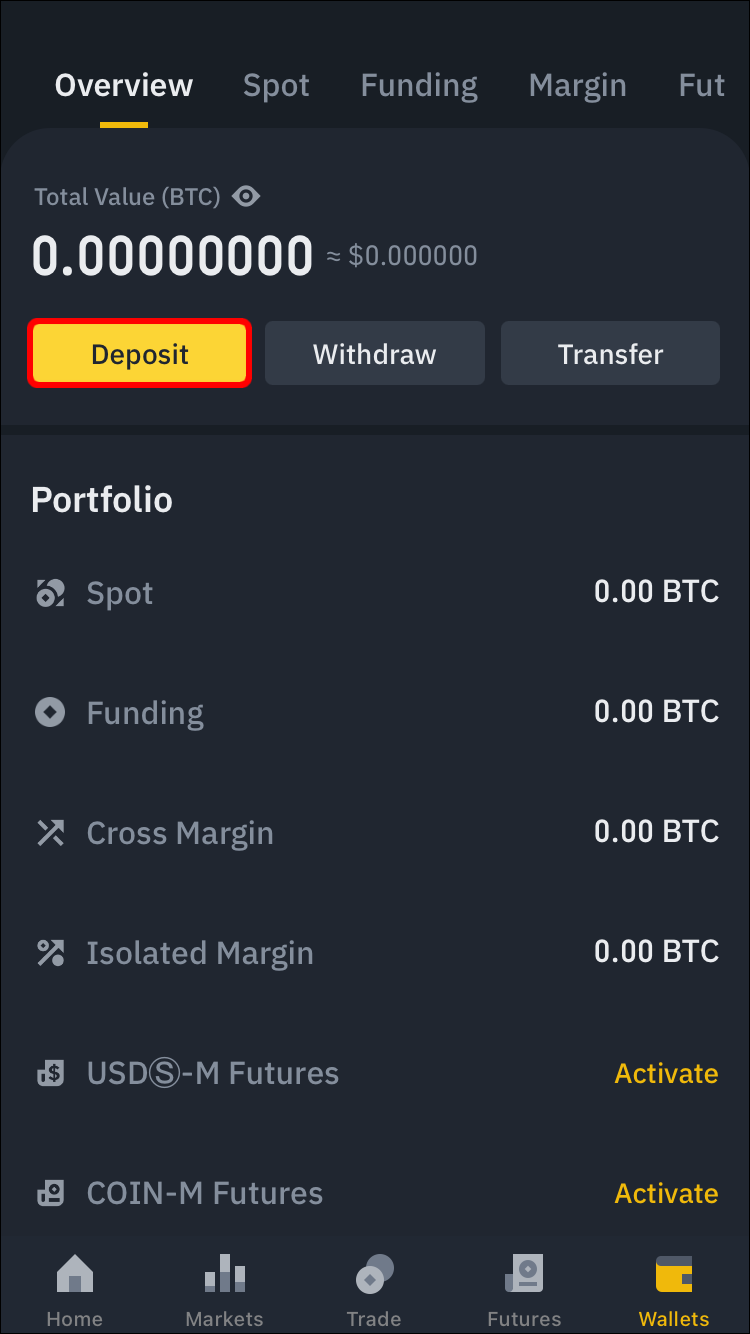
Open the Binance app and tap the wallet icon. Select “Deposit.” Search for the asset you plan to send, for example USDT. Binance displays a list of supported networks. Select TRC20. The app shows your deposit address as both a QR code and a text string. Copy the address carefully.
Step 3: Initiate the Withdrawal from Your Korean Exchange
Log in to Upbit or Bithumb. Go to the withdrawal section for the asset you are sending. Paste the Binance deposit address into the address field. Before confirming, verify that the network selected in the Korean exchange matches the network you chose in Binance. Both must show TRC20. If one shows ERC20 and the other shows TRC20, the funds will be sent to an incompatible address and cannot be recovered.
Enter the amount, complete any two-factor authentication required by the Korean exchange, and submit the withdrawal.
Step 4: Confirm Arrival in Binance
Return to the Binance app and check your wallet. USDT via TRC20 typically arrives within one to five minutes. You will also receive a notification from Binance when the deposit is credited.
A real example: a user transfers 500,000 KRW worth of USDT from Upbit to Binance. They purchase 370 USDT on Upbit, withdraw it via TRC20, and pay a 1 USDT withdrawal fee. 369 USDT arrives in their Binance spot wallet four minutes later. The total cost of the transfer is 1 USDT, which is approximately 1,350 KRW. Compared to a card purchase fee of 1.8%, this method saves roughly 5,300 KRW on the same transaction size.
Always send a small test amount the first time you use a new address. Send 10 USDT first, confirm it arrives correctly, and then send the remaining amount. This takes an extra five minutes and eliminates the risk of losing a large sum to an address error.
How to Use Binance P2P to Buy Crypto with Korean Won
Binance P2P is a marketplace where users buy and sell cryptocurrency directly with each other. It supports KRW and a wide range of Korean payment methods including Kakao Pay, Toss, and standard bank transfers. This makes it a practical option for Korean users who want to fund their Binance account without going through a domestic exchange first.
To access P2P, open the Binance app and tap “Trade,” then select “P2P Trading.” Choose the asset you want to buy, for example USDT, and set your currency to KRW. Binance displays a list of sellers with their prices, available amounts, payment methods, and completion rates.
Select a seller whose payment method matches what you want to use. Tap “Buy” and enter the amount. Binance holds the seller’s USDT in escrow while you complete the payment. Transfer the KRW to the seller’s account using the payment details they provide. Once you have sent the money, tap “Payment Completed” in the Binance app. The seller confirms receipt and Binance releases the USDT to your wallet.
A real example: a user wants to buy 200 USDT using Kakao Pay. They find a seller on P2P offering USDT at 1,385 KRW per USDT with a 98.7% completion rate. The total KRW amount is 277,000 KRW. The user transfers 277,000 KRW via Kakao Pay, taps “Payment Completed,” and receives 200 USDT in their Binance wallet within three minutes of the seller confirming. There is no deposit fee from Binance, and the only cost is the slight premium above the market rate built into the seller’s price.
Always check the seller’s completion rate before transacting. A completion rate above 95% indicates a reliable seller. Avoid sellers with low completion rates or very few total trades, as these carry a higher risk of disputes.
Common Deposit Mistakes and How to Avoid Them
Several deposit errors come up repeatedly among new Binance users. Each one is avoidable with a small amount of preparation.
Sending to the wrong network is the most costly mistake. Sending TRC20 USDT to an ERC20 address, or sending BEP20 tokens to a TRC20 address, results in funds that cannot be recovered. Always verify the network on both the sending and receiving side before confirming. If in doubt, cancel the transaction and start again.
Sending a minimum amount below the threshold causes the deposit to be rejected. Binance sets minimum deposit amounts for each asset and network. For TRC20 USDT, the minimum is typically 1 USDT. Check the minimum displayed in the Binance deposit screen before sending.
Using an expired or incorrect deposit address is rare but possible if you copied an address from an old screenshot. Always generate a fresh deposit address in the Binance app at the time of the transfer rather than reusing one saved from a previous session.
Skipping the test transfer on a first deposit is a risk that is easy to avoid. Sending 10 USDT as a test before transferring a larger amount takes five extra minutes and confirms that the address, network, and account settings are all correct.
Funding your Binance account is a straightforward process once you understand which method suits your situation. Korean users who use the crypto deposit method via TRC20 USDT will find it to be the most cost-effective and reliable option for regular funding. Card purchases work well for occasional small amounts when speed matters more than cost. P2P trading offers flexibility for users who prefer to pay directly in KRW without using a domestic exchange as an intermediary. Each method works reliably when the steps are followed carefully.